Wednesday, May 06, 2020

100 Days of Machine Learning Code Day 4

Eight wonders of the human brain - ScienceDirect
The functioning of Human Brain is still a big Unsolved Mystery

1: Biological Neuron versus Artificial Neural Network | Download ...
NN vs ANN


Day 4 was deep dive into ML after having warm-up with python and some hands on with prebuilt frameworks, so i started with the Deep Learning Week 1,2 by Andrew Ng on coursera which has a good explanation sepcially in week 2 ,the week 1 course theory and code might scare one off and seem too much to handle at first but after having glimpse at tensorflow we know there is a light at the other end and all the hands on on writing the Activation functions and equation ourselves is just to give us more clarity of what is running behind the curtains like when we used those magic commands  in Tensorflow  , week 2 was relatively more fun and less scary after week 1 and the code snippets and order of doing was 

  1.  Intro to Numpy and Vectorization
  2.  Broadcasting with  Numpy
  3. Building Basic Activation Function in Numpy
  4. Coursera - Logistic_Regression_with_a_Neural_Network_mindset_.
  5. Week 2 - Coursera Key_Planar_data_classification_with_onehidden_layer_v6c+key
Pro, Tip speedup Andrew NG to 1.3x and above saving time and a good mental excersie  , in the above code there was lot much boiler plate code provided and many plot functions just provided to us which we used without going through much documentation in detail  , which is okay for now and we are documenting it well so we can look back whenever needed but seeing tensorflow in parallel we wont be needing to go much in depth or memorise that code [probably, although i have the euqations memorised as a part of University curicullum for now] but will later do some from scratch coding on visualsation and hardcode some ML algo like KNN in future on my own dataset for the ProjectX i am targeting in paralle

PS : watched the Github Satellite [developer confrence]stream , VScode in browser would be reallly great if it comes with free tier for students credential , also lets see how Github discussion will stand different from Stackoverflow . Was amused by the fact that IT industry is so big and only 50 Million users are there on Github , If any of my project dosent take off as planned in few years time will open source all of them  until then  let see how well my implementation goes

Tuesday, May 05, 2020

100 Days of Machine Learning Code Day 3

Day 3 : Taking one Step at a time , creating first Neuron 
I have came across project using image and video processing using machine learning to identify faces, masks recognition etc and i hade heard about the library OpenCV but never actually did anything in it so going in this direction further i tried to get my hands on in OpenCV, interstingly it was developed by Intel , Tesseract was started in HP this one in intel and still Google ended up as industry leader in AI

So for my task for today was a coursera assignment in which i had to use OpenCV to identify faces in an Image of newspapper and also use tesseract to run OCR on the newspaper cliping and link word labels to the image


Its whe  running these solution on Google Colab vs Running on local instance when one start appreciating the power of cloud ,and this is when we are just getting started in ML .In parallel to this i have been been doing ML course by Andrew NG+ Tensorflow in Practise course so with this i created my first tiny intelligence :D , if you look in that way i have come across many examples during lectures , slides and video using numpy , pytorch etc how to create your first neural network but this is by far the smoothest and best mind blowing starter for beginners [provided you have know the underlying mechanism and terms , which i do]. so with that i wrote whats called the "Hello World " in Tensorflow , the thing about me is whenver i learn something new framework , tech or something else i always look up breif history and development that brought that thing in existence which over year starts conencting together in a dense mesh grraph in a chronological timeline and as i procced and learn more it becomes wider and sometimes even help learn more better and faster being able to see bit above and sideways of that topic and broadning the knowledge tree
 One of the videos i found internsing was by one of my favourite podcast host  @lexfridman the model.fit() fn is truly mindblowing after dealing with manually writing activation function and entire thing manually


Thats how " Hello World " code looks like :

import tensorflow as tf
import numpy as np
from tensorflow import keras
model = tf.keras.Sequential([keras.layers.Dense(units=1, input_shape=[1])])model.compile(optimizer='sgd', loss='mean_squared_error')xs = np.array([-1.0, 0.0, 1.0, 2.0, 3.0, 4.0], dtype=float)ys = np.array([-3.0, -1.0, 1.0, 3.0, 5.0, 7.0], dtype=float)model.fit(xs, ys, epochs=500)print(model.predict([10.0]))

! Dont forget to google out or understand individual component and try playing with number of epochs ;) ,[everyone has a differnet method of learning make your own path which suits you the most keeping both learning and motivation optimal]

PS : Also completed my python Specialisation today  


Monday, May 04, 2020

100 Days of Machine Learning Code Day 2


Tesseract in Marvel Universe , Unfortunately the one we will be dealing with is powerful enough too :)

Day 2 : There are plenty of resources online for the machine learning and for my learning apart from my theoretical lessons in University I am following "Andre NG ,deep learning.ai "course and "Tensorflow in practise" specialisation course in parallel for mix of theory and practical assignment but my posts and tasks will be more of goal oriented and one can refer to any resource of choice to fill in the knowledge gaps which are created during lessons , my advice is when learning a topic refer to many sources as possible unless you are clear with the topic and when learning something always  try to think what can you do with that thing or real life example of its implementation .

For the todays task we will be trying our hands on with Tesseract OCR engine, Kraken, OpenCV .Tesseract was intially developed at HP from (1985-1994) until it was open sourced in 2005 and later picked by Google in 2006 .Since then Tessearct has been widely used and now supports over 100 languages including hindi and also comes in JS package too which can be implmented in web browsers also .

Here is the Link to my Implementation of Tesseract in Google Colab

Here are the key takeaways and things to lookup :

- Image Binarize
- Image.NEAREST
- Image.BOX
- Image.BILINEAR
- Image.HAMMING
- Image.BICUBIC
- Image.LANCZOS

The Art of Hotel Transylvania 3. The Kraken - Scott Wills http ...

 Next up we will be going through another image processing library called Kraken which is used for
edge detection and drawing boxes around the text in the image , and return you the coordinates  of the boxes around the text
The task here is to take in input image , find the box coordinates and draw on top of it, the later part includes the code to get even more accurate results by identifying the line gap by calculating the distance between them and drawing a line horizontaly
Interestingly running few function pixel by pixel over a large image is resource intensive and using Kraken in an live project would be slow(there are faster methods to to that)

- Hers is the code implementation in google colab and preview


there were part of functions that were difficult to understand at first but by implmenting it line by line tweaking it and trying out with changes gave more clarity of that and how each line of code is was working

Till now we havent started with actual machine learning and this was just the warmup, implementing all these library and OCR method gave rise to a question in my mind how did these library do OCR and image to text in 80's when the c machine learning didnt exist as we know it ?
The best answer i found is in this IEEE Paper -DOI: 10.1109/ICDAR.2007.4376991

Coming up with Opencv followed by some basic algorithms or maybe simple neural networl we will start into actual machine learning

PS: I this the above link dosent work or you need individual files here is link to my #100DaysofMLcode  Github repository   

Sunday, May 03, 2020

100 Days of Machine Learning Code Day 1


Getting Started with #100daysofML Day 1  , in journey of learning ML/DL one encounter with images sooner or later and learning to play around with them in python is necessary , for the series of post i wil be using using a mix of google colab , Jupyter Notebook on Local Instance Github gists for code snippets and NBviewer for viewing the notebooks saved in my github repo for online view , will be skipping the basics majority of times as there are plenty of better explnation online about them and will be focsing more on the "Geeting Hands Dirty " and implementation side

Day 1 is not machine learning  and more of warm up in python that will help us later

Here is a list of  required resources in order  :
List of Image Manipulation Tools in Python (will be using Pillow for now)
Setup and Getting Started
- Adding Data in Google Colab

Prerequisites will be Python , and Running code in Jupyter Notebook, although one can easily setup and run these codes locally on your notebook but my prefernce will be to get more comfortable with Google Colab or any other cloud instance so that as one proceed you can run more GPU and CPU intensive tasks on powerful server provided you for free in learning stage rather than setting you Machine on Fire [unless you have a really good spec machine]

So the task is to get an image modify the RGB channels of the Image , in differnet intensities combine them in a 3X3 grid with image label written below each image
Here are the Links to the question statement
 - Question Statement [Week 1 Assignment of Coursera Python Pillow]
My Attempt at google colab


PS: I this the above link dosent work or you need individual files here is link to my #100DaysofMLcode  Github repository   

Friday, May 01, 2020

#100 Days of Code - Initialize.....

As the world Undergoes the Covid-19 lockdown everything is going at slow pace be at Academics , or Internship procedure in University  , while my college figure out the plans on how to carry out the exams and continue with the remaining semester while the company I am going to join as Interm reschedule the timeline in match with the college calender , its been over the month i  came back home in end of  march and with the few lectures going on microsoft teams there was plenty of time to get on things i didnt get time for from  cooking , to hardware teardown & repair  , plenty of sleep , clean formating and upgrading Ubuntu 18 to 20 LTS while seting up windows 10 in dual boot this time .
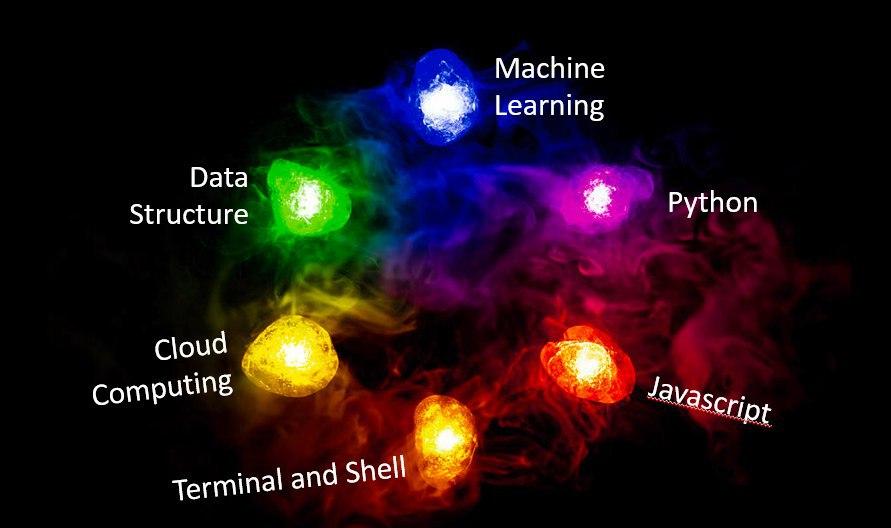
To Help with students stuck at home due to the pandemic many educational websites have provided with free access to student on their otherwise paid courses which helped me keep up with learning pace and accelerated my journey to collect the infinity stones i need for snapping my project into existence 

Made this Image a year back for a ppt , when Endgame had released
So I signed up on Plurasight (for Web Develeopment and C++ 14,17 course), Progate (to get stared with JS beginner), Codeacademy (complete JS and Node.js) , and my college Coursera acces for Python and ML) , with Leetcode 30 days challenge throught april , built my Notes repo Notex using github pages , CI/CD build and Mkdocs to collect all those precious code in a searchable portal


With no major submission in University until June for now and to actually get hands dirty with things as I learn them will start with #100DaysofMachineLearning , #100DaysofCode , with a daily progress update and notes on my learning and ProjectX update Starting May-1 lets see how long the Streak continues :)  

PS: Also to write more and utilise my domain 🤣