Showing posts with label Cloud. Show all posts

Friday, November 17, 2017

My Last Workshop to Jr. in College

Conducted Workshop as Microsoft Student Partner at the University 
MSPs Involved: Sheryl Bernard and Harshit Yadav
Event Date: 12/10/2017
No. of Attendees: 30+
Duration: 2 hr
Topics covered:
Microsoft Products and Programs
Imagine Cup
MSP program
Microsoft Azure
Imagine Cup
Office Lens
Visual Studio Code
Git
A Hands on Session was also Conducted in which Students Learned to use Visual Studio Code and made a Github Page
PS:Feedback was collected at the end of the session and a small assignment sort of has been given to students to explore more about Microsoft and Azure


Tuesday, August 08, 2017

IMAD Hasura — Week 2

Building your webapp
  1. Practical: SSH + Network experiments
  • Topics Covered : SSH ,
  • installing putty , login ,ifconfig,ipv4=2x32,ipv6=2x128 size address
  • ping, packet loss , round trip time , traceroute
  • plotting traceroute IP on MAP
  • Ping command being disabled by ICMP protocol
  • Video Link : Youtube 
  • Google Drive Link : Google Docs 
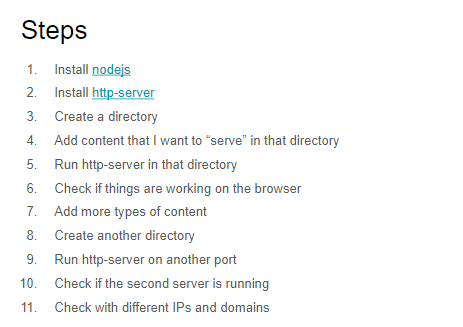
2.Practical: Building a webapp with nodejs and using git. Introduction to reverse proxies.
  • Deploying app how it works 
  • Forking project from github 
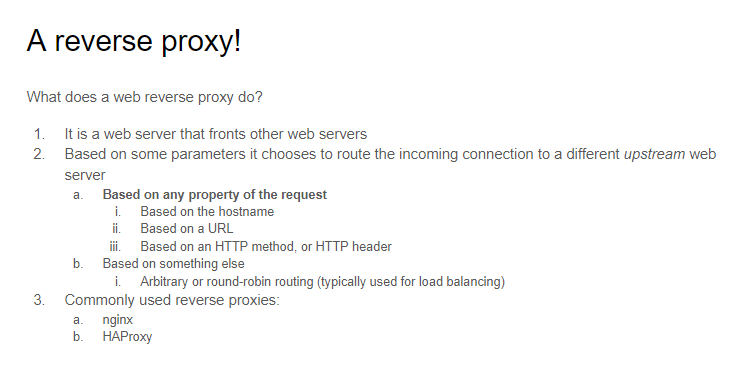
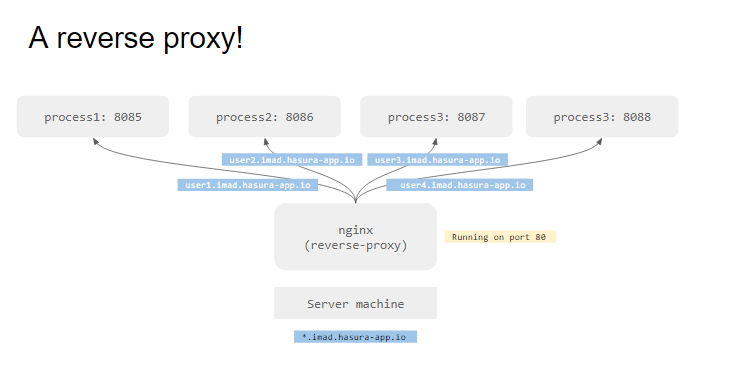
  • How do multiple domain work on same IP 1) Every User use different port number 2) Using the Reverse Proy 
  • Concept of Load Balancing using nginx
  • npm install to install all the dependencies
  • starting server on port 8080 by command node server.js
  • Video Link : Youtube
  • Google Drive Link : Google Docs
3.Practical: Introduction to server-side javascript and HTML/CSS
  • Server side programming to rediredt
  • introduction to HTMl
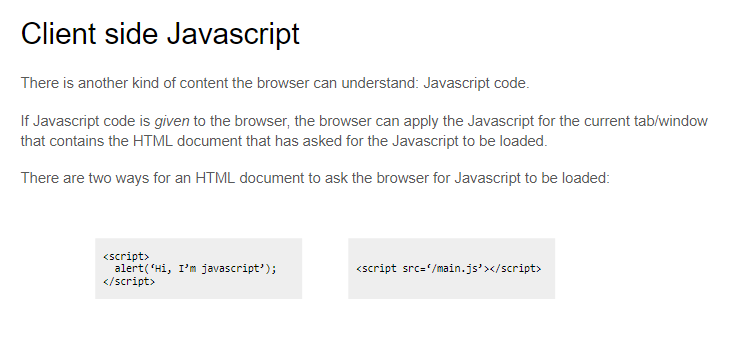
4.Practical: Introduction to client-side Javascript
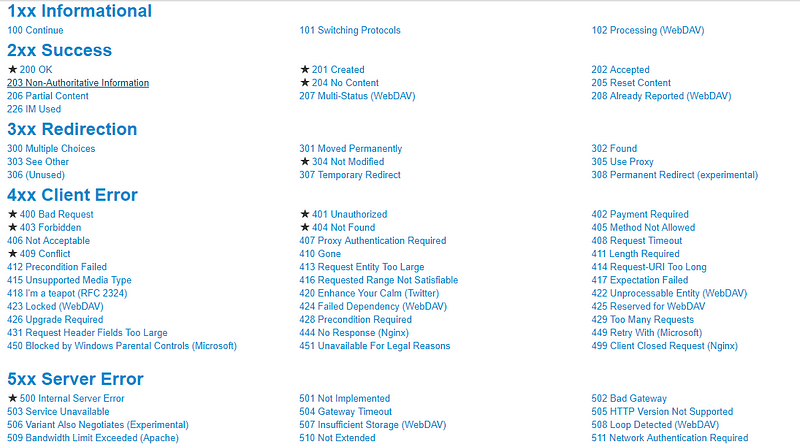
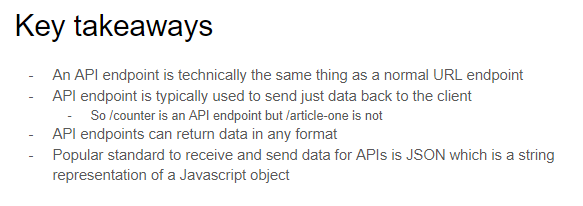
HTTP request code 

Sunday, August 06, 2017

IMAD Hasura — Week 1

Week 1 Lectures: Introduction to the Internet
  1. Introduction to a Web App
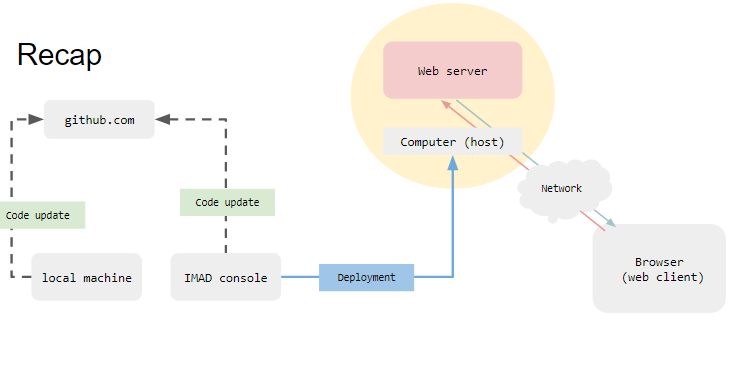
  • Topics Covered : What is a webapp , Web Client , Web Browser , URL , DNS ,Simple introduction to Network , ISP , Web Server 
  • Video Lecture : Youtube Link
  • Slide Link : Google Drive 
2. Building a web App
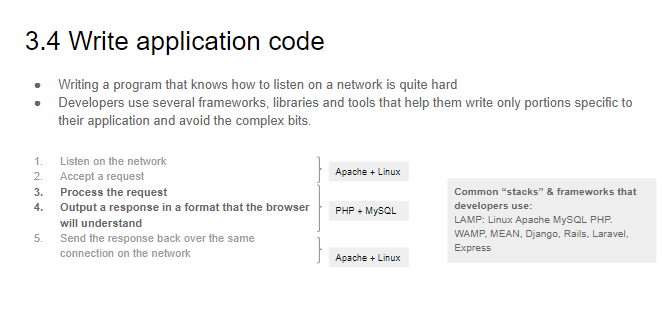
  • Topics Covered : Domain Names , Setting up a web server (Hosting or local),Setting up DNS , Writing application code(technology stack )
3. Networks
  • Topics Covered : Simple Network , IP network ,IP address , Port Numbers,Protocols
  • Video Lecture : Youtube Link
  • Slide Link : Google Drive
4. Practically running your own server
5. Protocols
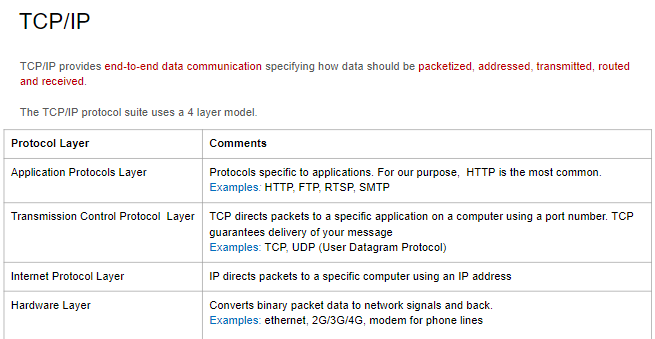
  • Topics Covered : TCP/IP , Protocols


Sunday, June 25, 2017

Difference between AI , Machine Learning and Deep Learning


Artificial Intelligence —  Human Intelligence Exhibited by Machines

According to the father of Artificial Intelligence, John McCarthy, it is “The science and engineering of making intelligent machines, especially intelligent computer programs”.
Artificial Intelligence is a way of making a computer, a computer-controlled robot, or a software think intelligently, 
The concept of “General AI” are fabulous machines that have all our senses (maybe even more), all our reason, and think just like we do. You’ve seen these machines endlessly in movies as friend — C-3PO — and foe — The Terminator. General AI machines have remained in the movies and science fiction novels for good reason; we haven't been able to make them , at least not yet.
What we are able to make these days are “Narrow AI.” Technologies that are able to perform specific tasks as well as, or better than, we humans can. Examples of narrow AI are things such as image classification on a service like Pinterest and face recognition on Facebook.

Machine Learning — An Approach to Achieve Artificial Intelligence

Machine Learning at its most basic is the practice of using algorithms to parse data, learn from it, and then make a determination or prediction about something in the world. So rather than hand-coding software routines with a specific set of instructions to accomplish a particular task, the machine is “trained” using large amounts of data and algorithms that give it the ability to learn how to perform the task.

Deep Learning — A Technique for Implementing Machine Learning
Another algorithmic approach from the early machine-learning crowd, Artificial Neural Networks, came and mostly went over the decades. Neural Networks are inspired by our understanding of the biology of our brains – all those interconnections between the neurons. But, unlike a biological brain where any neuron can connect to any other neuron within a certain physical distance, these artificial neural networks have discrete layers, connections, and directions of data propagation.

You might, for example, take an image, chop it up into a bunch of tiles that are inputted into the first layer of the neural network. In the first layer individual neurons, then passes the data to a second layer. The second layer of neurons does its task, and so on, until the final layer and the final output is produced.
Example  – Cat vs. Dog
Let’s take an example of an animal recognizer, where our system has to recognize whether the given image is of a cat or a dog.

List of the 10 hottest AI technologies:
  1. Natural Language Generation: Producing text from computer data. Currently used in customer service, report generation, and summarizing business intelligence insights. Sample vendors: Attivio, Automated Insights, Cambridge Semantics, Digital Reasoning, Lucidworks, Narrative Science, SAS, Yseop.
  2. Speech Recognition: Transcribe and transform human speech into format useful for computer applications. Currently used in interactive voice response systems and mobile applications. Sample vendors: NICE, Nuance Communications, OpenText, Verint Systems.
  3. Virtual Agents: “The current darling of the media,” says Forrester (I believe they refer to my evolving relationships with Alexa), from simple chatbots to advanced systems that can network with humans. Currently used in customer service and support and as a smart home manager. Sample vendors: Amazon, Apple, Artificial Solutions, Assist AI, Creative Virtual, Google, IBM, IPsoft, Microsoft, Satisfi.
  4. Machine Learning Platforms: Providing algorithms, APIs, development and training toolkits, data, as well as computing power to design, train, and deploy models into applications, processes, and other machines. Currently used in a wide range of enterprise applications, mostly `involving prediction or classification. Sample vendors: Amazon, Fractal Analytics, Google, H2O.ai, Microsoft, SAS, Skytree.
  5. AI-optimized Hardware: Graphics processing units (GPU) and appliances specifically designed and architected to efficiently run AI-oriented computational jobs. Currently primarily making a difference in deep learning applications. Sample vendors: Alluviate, Cray, Google, IBM, Intel, Nvidia.
  6. Decision Management: Engines that insert rules and logic into AI systems and used for initial setup/training and ongoing maintenance and tuning. A mature technology, it is used in a wide variety of enterprise applications, assisting in or performing automated decision-making. Sample vendors: Advanced Systems Concepts, Informatica, Maana, Pegasystems, UiPath.
  7. Deep Learning Platforms: A special type of machine learning consisting of artificial neural networks with multiple abstraction layers. Currently primarily used in pattern recognition and classification applications supported by very large data sets. Sample vendors: Deep Instinct, Ersatz Labs, Fluid AI, MathWorks, Peltarion, Saffron Technology, Sentient Technologies.
  8. Biometrics: Enable more natural interactions between humans and machines, including but not limited to image and touch recognition, speech, and body language. Currently used primarily in market research. Sample vendors: 3VR, Affectiva, Agnitio, FaceFirst, Sensory, Synqera, Tahzoo.
  9. Robotic Process Automation: Using scripts and other methods to automate human action to support efficient business processes. Currently used where it’s too expensive or inefficient for humans to execute a task or a process. Sample vendors: Advanced Systems Concepts, Automation Anywhere, Blue Prism, UiPath, WorkFusion.
  10. Text Analytics and NLP: Natural language processing (NLP) uses and supports text analytics by facilitating the understanding of sentence structure and meaning, sentiment, and intent through statistical and machine learning methods. Currently used in fraud detection and security, a wide range of automated assistants, and applications for mining unstructured data. Sample vendors: Basis Technology, Coveo, Expert System, Indico, Knime, Lexalytics, Linguamatics, Mindbreeze, Sinequa, Stratifyd, Synapsify.

Sunday, May 14, 2017

MVA Know it prove it- Web Development -2 HTML5 & CSS3 - iii

Article Tag
Article is a HTML5 semantic element, similar to <section> and <header>. It is most commonly used to contain information that may be distributed independently from the rest of the site or application it appears in.

The HTML5 <article> element represents a complete composition in a web page or web application that is independently distributable or reusable, e.g. in syndication. This could be a forum post, a magazine or newspaper article, a blog entry, a user-submitted comment, an interactive widget or gadget, or any other independent item of content.


Section Tag
The section element represents a generic section of a document or application. A section, in this context, is a thematic grouping of content, typically with a heading.


Examples of sections would be chapters, the various tabbed pages in a tabbed dialog box, or the numbered sections of a thesis. A Web site's home page could be split into sections for an introduction, news items, and contact information.


DIV Tag
The HTML <div> tag is used for defining a section of your document. With the div tag, you can group large sections of HTML elements together and format them with CSS.
The difference between the div tag and the span tag is that the div tag is used with block-level elements whilst the span tag is used with inline elements.


Forms Tag
The HTML <form> tag is used to create an HTML form and it has following syntax:

<form action="Script URL" method="GET|POST">
    form elements like input, textarea etc.
</form>

Two commonly used methods for a request-response between a client and server are: GET and POST.
  • GET - Requests data from a specified resource
  • POST - Submits data to be processed to a specified resource

Reset CSS


A CSS reset is a set of styles you load prior to your other styles, to remove browser built-in styles. One of first and most popular ones was Eric Mayer's Reset CSS.
Another option is to harmonize browser built-in styles. The most popular tool to achieve this is currently Normalize.css.

Selectors

Selectors define to which elements a set of CSS rules apply.

Type selectors
This basic selector chooses all elements that matches the given name.
Syntax: eltname
Example: input will match any <input> element.
Class selectors
This basic selector chooses elements based on the value of their class attribute.
Syntax: .classname
Example: .index will match any element that has the class index (likely defined by a class="index" attribute or similar).
ID selectors
This basic selector chooses nodes based on the value of its id attribute. There should be only one element with a given ID in a document.
Syntax: #idname
Example: #toc will match the element that has the id toc (likely defined by a id="toc"attribute or similar).
Universal selectors
This basic selector chooses all nodes. It also exists in a one-namespace only and in an all-namespace variant too.
Syntax: * ns|* *|*
Example: * will match all the elements of the document.
Attribute selectors
This basic selector chooses nodes based on the value of one of its attributes.
Syntax: [attr] [attr=value] [attr~=value] [attr|=value] [attr^=value] [attr$=value] [attr*=value]
Example: [autoplay] will match all the elements that have the autoplay attribute set (to any value).
Cascading order of preference


Canvas Element

The HTML <canvas> element is used to draw graphics, on the fly, via JavaScript.
The <canvas> element is only a container for graphics. You must use JavaScript to actually draw the graphics.
Canvas has several methods for drawing paths, boxes, circles, text, and adding images.


What is SVG 

Scalable Vector Graphics (SVG) is an XML-based vector image format for two-dimensional graphics with support for interactivity and animation. The SVGspecification is an open standard developed by the World Wide Web Consortium (W3C) since 1999

The difference between vector and raster graphics is that raster graphics are composed of pixels, while vector graphics are composed of paths. A raster graphic, such as a gif or jpeg, is an array of pixels of various colors, which together form an image.

Vendor Prefixes
When CCS3 was first being introduced, a number of excited properties began to hit different browsers at different times. For example, the webkit-powered browsers (Safari and Chrome) were the first ones to introduce some of the animation-style properties like transform and transition. By using vendor prefixed properties, web designers were able to use those new features in their work and have them seen on the browsers that supported them right away, instead of having to wait for every other browser manufacturer to catch up!

So from the perspective of a front-end web developer, browser prefixes are used to add new CSS features onto a site while  having comfort knowing that the browsers will support those styles. This can be especially helpful when different browser manufacturers implement properties in slightly different ways or with a different syntax.

Responsive  Web Design
Responsive web design (RWD) is an approach to web design aimed at allowing desktop webpages to be viewed in response to the size of the screen or web browser one is viewing with. In addition it's important to understand that Responsive Web Design tasks include offering the same support to a variety of devices for a single website. As mentioned by the Nielsen Norman Group: content, design and performance are necessary across all devices to ensure usability and satisfaction

Bootstrap
Bootstrap is a free and open-source front-end web framework for designing websites and web applications. It contains HTML- and CSS-based design templates for typography, forms, buttons, navigation and other interface components, as well as optional JavaScript extensions. Unlike many web frameworks, it concerns itself with front-end development only.


Tuesday, May 02, 2017

MVA Know it prove it- Web Development -2 HTML5 & CSS3 - ii

W3C
The World Wide Web Consortium (W3C) is the main international standards organization for the World Wide Web (abbreviated WWW or W3).
Founded and currently led by Tim Berners-Lee, the consortium is made up of member organizations which maintain full-time staff for the purpose of working together in the development of standards for the World Wide Web.
The W3C also engages in education and outreach, develops software and serves as an open forum for discussion about the Web.


Absolute URL 
Absolute URL requires you to place the entire address on the page that you link to. An example of an absolute URL would look like this:

<a href = http://www.example.com/xyz.html>

Relative URL
The relative URL, on the other hand, does not use the full address. It assumes that the page you type in is on the same site. An example of a relative URL would look like this:


<a href = “/xyz.html”>

Why Choose Absolute URL  ?


– FOILS SCRAPERS

An absolute URL makes it harder for people to scrape information from your website using scraper programs. If you have all of your internal links as relative URLs, it would be very easy for a scraper to simply scrape your entire website and put it up on a new domain.

– DISALLOWS DUPLICATE CONTENT

It’s very important to have absolute URLs in order to avoid duplicate content issue. Imagine you have multiple versions of root domains that are indexed in Google without a canonical tag point to correct version of the site.

– IMPROVE INTERNAL LINK STRATEGY

While coding URL, you do want to think about internal linking. If you have a <base href> tag that was implemented wrong on the site along with relative URLs, it will create a page that will land on 404 error page.

Why Choose Relative  URL  ?

– QUICKER CODING

Large websites are made much easier to code when you shorten your URL into a relative format.
– STAGING ENVIRONMENT
If you are using a content management system that has staging environment with its own unique domain like WordPress or SharePoint, then your entire website is replicated on that staging domain. The relative format allows the same website to exist on staging and production domain, or the live accessible version of your website, without having to go back in and recode all of the URLs. This not only makes coding easier for a web developer but also serves as a time saver.

– FASTER LOAD TIMES

Pages that use a relative URL will load more quickly than pages using absolute URLs, for the most part, although the difference is miniscule at best.


Sunday, April 30, 2017

MVA Know it prove it- Web Development -2 HTML5 & CSS3 - i

HTML 5 
HTML5 is a markup language used for structuring and presenting content on the World Wide Web. It is the fifth and current version of the HTML standard.

Many new syntactic features are included. To natively include and handle multimedia and graphical content, the new <video>, <audio> and <canvas> elements were added, and support for scalable vector graphics (SVG) content and MathML for mathematical formulas. To enrich the semantic content of documents, new page structure elements such as <main>, <section>, <article>, <header>, <footer>, <aside>, <nav> and <figure>, are added. New attributes are introduced, some elements and attributes have been removed, and others such as <a>, <cite> and <menu> have been changed, redefined or standardized.

-> HTML5shim Javascript file to use html5 features in older Browsers

CSS 3
CSS3 is the latest evolution of the Cascading Style Sheets language and aims at extending CSS2.1. It brings a lot of long-awaited novelties, like rounded corners, shadows, gradients, transitions or animations, as well as new layouts like multi-columns, flexible box or grid layouts. Experimental parts are vendor-prefixed and should either be avoided in production environments, or used with extreme caution as both their syntax and semantics can change in the future.


HTML 5 is for structuring the content and CSS is for styling the content 

Validator
A validator is a computer program used to check the validity or syntactical correctness of a fragment of code or document. The term is commonly used in the context of validating HTML,CSS and XML documents or RSS feeds though it can be used for any defined format or language.

Example Link  :  Validator.nu

Basic HTML Tags and Explanation  

<!DOCTYPE HTML>   Instruction to browser to instruct which set of rules to use while interpreting

<br>...<br/ >  One of the Style for Self Enclosing Tags

<html lang="en">  For Search Engine , Accessibility  & and Page Translation

<nav> For ease of navigation using keyboard , Accessibility

<meta>  To add context to HTML document , SEO optimization

Example :


<meta name="keywords" content="HTML, Meta Tags, Metadata" />
<meta name="description" content="Learning about Meta Tags." />
<meta name="revised" content="Tutorialspoint, 3/7/2014" />
<meta http-equiv="refresh" content="5" />
<meta http-equiv="Content-Type" content="text/html; charset=UTF-8" />
<meta http-equiv="cookie" content="userid=xyz; expires=Wednesday, 08-Aug-15 23:59:59 GMT;" />
<meta http-equiv="refresh" content="5; url=https://www.tutorialspoint.com" />

Saturday, April 29, 2017

MVA Know it prove it- Web Development -1 Getting Started with Web Technologies


Languages for Web Technologies :

C#, Ruby , Java , Javascript, Python, PHP , CSS , LESS ,SASS , HTML

Backend Framework and Libraries :

Ruby on Rails , PHP , Node.js , Django , Flask ,ASP.net Web forms , ASP.NET MVC

Front-end Frameworks and Libraries:  

Bootstrap , jQuery , Knockout ,Angular ,Ember ,Backbone ,React

Data Storage Technologies :

MongoDB , SQL Server , MySQL , NoSQL , Oracle .Postgres , Hadoop


Test Driven Development

Test-driven development (TDD) is a software development process that relies on the repetition of a very short development cycle: requirements are turned into very specific test cases, then the software is improved to pass the new tests, only.


In order from basic Functionality to higher functionality  


SPA 
Single-Page Applications (SPAs) are Web apps that load a single HTML page and dynamically update that page as the user interacts with the app. SPAs use AJAX and HTML5 to create fluid and responsive Web apps, without constant page reloads. However, this means much of the work happens on the client side, in JavaScript.


Scaling 
Scalability is the capability of a system, network, or process to handle a growing amount of work, or its potential to be enlarged to accommodate that growth. For example, a system is considered scalable if it is capable of increasing its total output under an increased load when resources (typically hardware) are added.


Using Json Data , Xml to let different languages communicate each other 


Resources :  

- > Microsoft Virtual Academy  
- > Algorithm Coding Dojo
- > Code Pen 

Learning Backend Frameworks  :
-> Python and Django (good for Beginners)
-> PHP (good for Beginners)
-> C# and MVC
->Javascript & Node.JS/Express
-> Ruby & Rails (Should be 2nd  framework)
-> Java & Spring


MVA Know It Prove it - Web Development

Starting the Microsoft Virtual Academy Know it Prove it Challenge - Web Development  Course which consists of 15 Hhs Video duration lecture and 3 Courses

1) Getting Started with Web Technologies
2) HTM5 & CSS3 Fundamentals
3)JavaScript Fundamentals

Will Try to Finish as soon as  possible ....Let the Learning Begin